

Polymarket alerts: know when top traders make their move
You cannot watch a thousand wallets. An alert can, and it only speaks up when an order is big enough to matter.
Key Takeaways
- An alert watches a wallet, a cohort or a rule like the top 1,000 traders, and tells you when they buy or sell more than an amount you set.
- It adds up each trader's fills on an outcome over a rolling window, so one big order that fills in many pieces counts once, at its full size.
- Windows run from 1 hour to 1 month, and an alert fires at most once per window.
- Alerts always show up in the app, and they can go to Telegram too.
Contents
At 4:45 p.m. Eastern on Sunday, September 28, 2026, about three and a half hours before the Eagles played the Bears, one of the 1,000 most profitable wallets on Polymarket bought "Eagles -3.5" at 48¢. It spent $94,643.
On-chain, that didn't arrive as one trade. It arrived as fifteen fills in 56 seconds: one of $88,192, three between $363 and $3,691, and eleven under $200, the smallest just $2.77.
That's normal on Polymarket. A big order gets matched against whatever orders are sitting on the other side of the book, and each match is its own fill. It's also why so many whale alerts are noise. A bot that pings you for every fill over $10,000 would have reported the $88,192 and missed the rest. A bot that pings you for every fill would have buzzed fifteen times in a minute.
A Datadash alert adds the fills up. Set one to watch the top 1,000 traders for buys over $10,000 within an hour, and this order counts once, at its full $94,643.
(For the record, the Eagles didn't cover. An alert tells you what top traders are doing, not whether they're right.)
What an alert can watch
Alerts watch trades made by the wallets you care about. You can point one at:
- A wallet: one trader you follow.
- A cohort: every wallet in a group you've saved, static or dynamic.
- Trader stats: a rule on rank, profit or ROI, like "rank 1,000 or better, all time". It watches whoever meets the rule right now, so when a trader climbs into the top 1,000, your alert starts watching them too.
An alert reads like a sentence
When you click New Alert on the Alerts page, the rule is laid out as a single sentence. Here's one we run, which watches the 1,000 most profitable Politics traders:
Fires when Rank ≤ 1,000 in Politics during All time performs Buy total more than $25,000 where Category in Politics within 1 hour
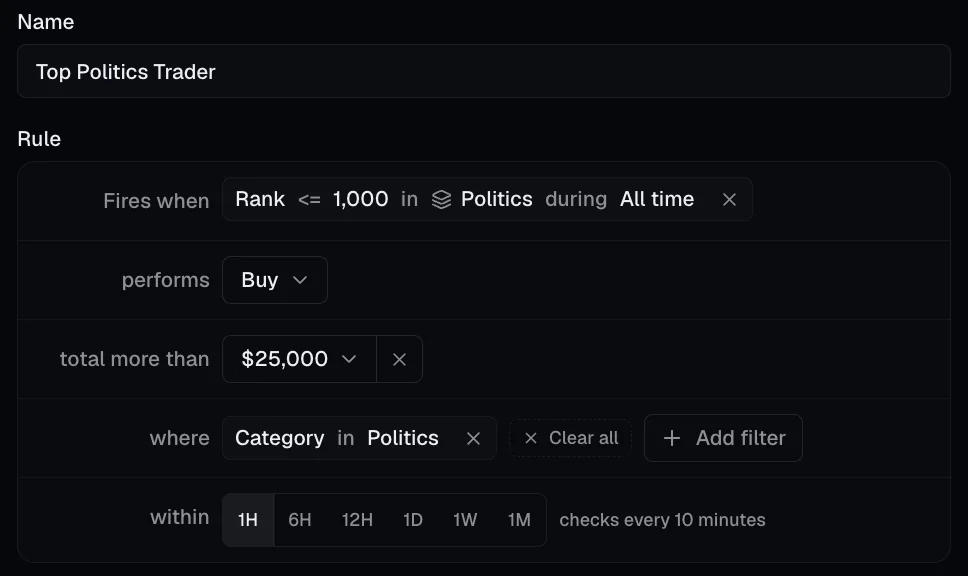
The same rule in the app. A one-hour window is checked every 10 minutes.
Each part is a choice:
- Fires when: who to watch, whether that's a wallet, a cohort or a trader-stats rule.
- performs: Buy, Sell or any activity.
- total more than: the dollar amount that counts as big. Presets run from $1,000 to $1,000,000, or you can type your own.
- where: optional filters for a specific market or a category.
- within: the window, from 1 hour to 1 month.
"Total" is doing the heavy lifting. For each trader, we add up their buys, or their sells, on each outcome across the window, and the alert fires when any trader's total crosses your amount. Buys and sells are counted separately, so a trader who buys $6,000 and sells $6,000 hasn't "traded $12,000".
How the timing works
Each window has its own check schedule:
| Window | Checked every |
|---|---|
| 1 hour | 10 minutes |
| 6 hours | 30 minutes |
| 12 hours | 1 hour |
| 1 day | 2 hours |
| 1 week | 12 hours |
| 1 month | 1 day |
Every check looks back over one full window. An hourly alert checking at 10:40 looks at everything from 9:40 to 10:40.
When an alert fires, it goes quiet until a full window has passed, then picks up exactly where it left off. Say your hourly alert fires at the 10:00 check. The checks from 10:10 to 10:50 skip it. At 11:00 it looks at 10:00 to 11:00, the hour right after the one it already told you about. You never hear about the same trade twice, and nothing slips through the gap between two notifications.
How long will you wait? At most one check interval, plus the minute or so it usually takes a new trade to show up on Datadash. On an hourly alert, a trade at 10:01 is picked up by the 10:10 check. The Eagles order above finished at 4:46 p.m., so an hourly alert that wasn't already in its quiet period would have picked it up at the 4:50 check.
Short windows catch a move as it happens. Long windows catch slow accumulation. A trader who buys $20,000 a day for a week never trips an hourly alert set at $100,000, but a weekly one catches them before the week is out.
Where alerts show up
In the app. Every alert that fires lands in your notifications, with an unread count on the bell. Each one gives you the alert's name and a line like "Total $2,340 across 3 trades." Click it, and you land on the exact trades that set it off. Notifications are kept for 7 days.
On Telegram. You can add Telegram to an alert, so it reaches your phone even when Datadash isn't open.
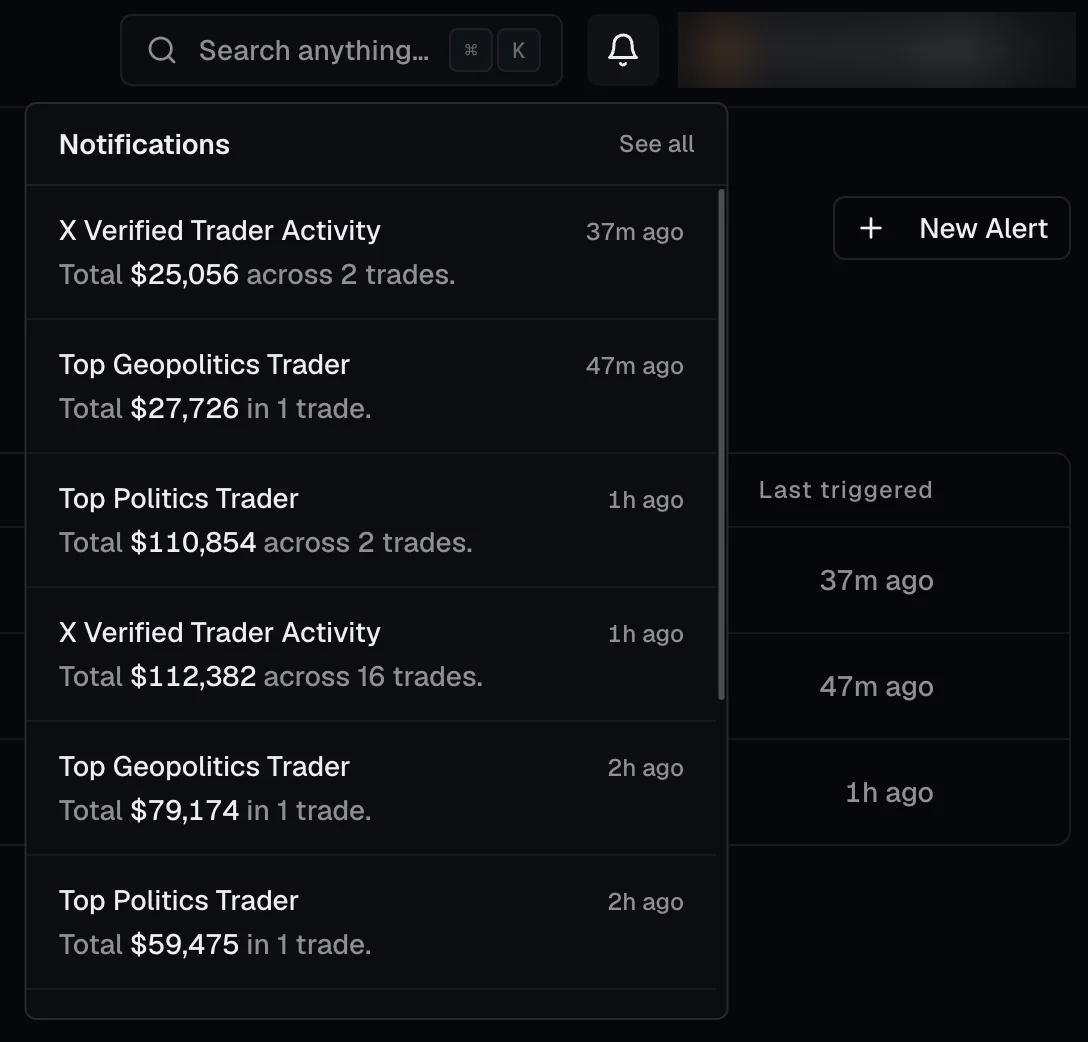
Notifications from three of our alerts on October 1, 2026.
One-click alerts with Track
Sometimes you don't need a rule. You just want to know when one trader touches one position, like when the trader you copied starts selling.
That's what Track is for. You'll find it next to each position on a trader's page and on every row of the Signals table. Hit it, and you'll be notified whenever that trader buys or sells that position, at any size. Hit View alert to see it, and Stop tracking when you're done.
Four alerts worth setting up
- Whale buys in your category. Top 1,000 traders, Buy, more than $10,000, Category is Politics, within 1 hour.
- Your specialists. A cohort like Weather Traders, any activity, more than $1,000, within 1 day.
- The exit warning. A trader you copied, Sell, more than $5,000, on the market you share, within 1 hour. Or just hit Track on their position.
- Slow accumulation. Your cohort, Buy, more than $100,000, within 1 week.
A few questions we get
Will I get a notification for every trade? No. An alert fires at most once per window, and each notification sums up everything that crossed your bar.
Can I get alerts on price moves? Not today. Alerts watch trades by wallets, because who is trading, and how much, is the part a price chart can't tell you.
Can I create alerts through the API or MCP? Not yet, but both are coming soon. For now, alerts live in the web app.
Try it
Open Alerts, click New Alert and start simple: the top 1,000 traders buying more than $10,000 within an hour, in the category you follow most. Then tune the amount until it pings you about as often as you'd like.
Not sure whose moves to watch? Start with Smart Money to see where top wallets lean, or build your own list of traders as a cohort.