

What is a cohort? Track a group of Polymarket traders as one
Following one wallet is easy. Following the 50 best weather traders is a spreadsheet, unless you save them as a cohort.
Key Takeaways
- A cohort is a saved group of Polymarket wallets that you can analyze and follow as if it were one trader.
- Static cohorts are a fixed list you paste, upload or build from wallet pages. Dynamic cohorts are rules that re-run every day.
- Every account comes with Followed Wallets, a special static cohort that adds a trader whenever you hit Follow on their profile.
- Every cohort gets combined PnL, positions and activity, plus its own Signals and Smart Money views.
- Point an alert at a cohort and you hear about it whenever any member makes a big move.
Contents
Say you've found a handful of weather traders on Polymarket who keep calling it right. You bookmark their profiles. A week later you have eleven tabs open, you've checked them all twice, and you still missed the trade that mattered, because it happened at 4 a.m.
That's the problem a cohort solves. A cohort is a saved group of wallets that Datadash treats like one big trader: one combined PnL, one portfolio, one trade feed, and one place to set alerts.
Two kinds of cohort
When you create a cohort on Datadash, you pick one of two types.
Static: a fixed list. You decide exactly who's in it. Paste wallet addresses, drop in a CSV or TXT file, or hit Add to cohort on any trader's page. It's good for traders you've vetted yourself, a list someone shared in a thread, or friends you like to keep an eye on.
Dynamic: rules. You describe the kind of trader you want, and Datadash finds every wallet that fits. The rules re-run every day, so new wallets join when they qualify and others drop out when they stop qualifying. You can also hit Refresh whenever you like.
Put simply, a static cohort is a guest list. A dynamic cohort is a bouncer with a checklist.
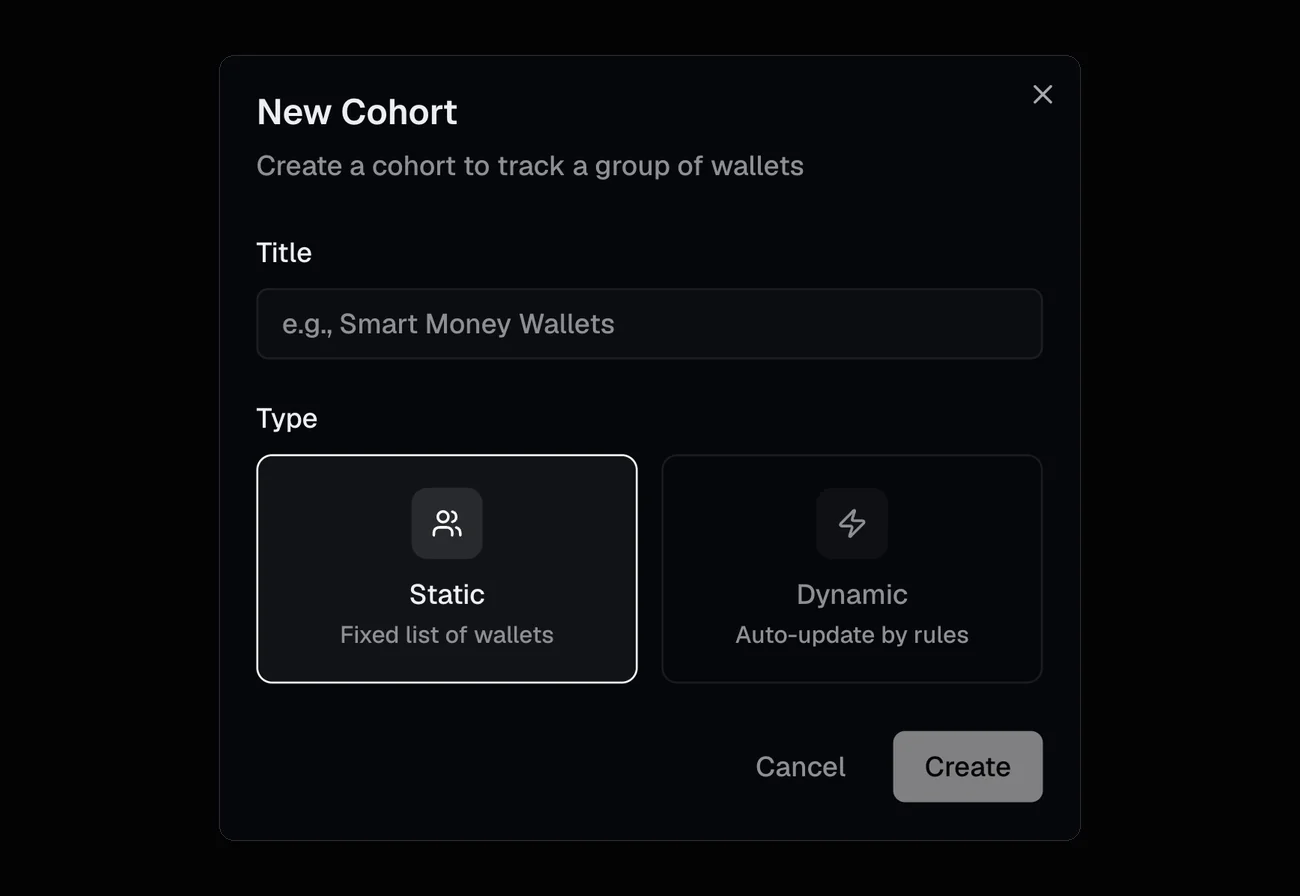
Every cohort starts here: give it a name, then pick Static or Dynamic.
What you can build rules from
Dynamic cohorts are built from criteria, and there are five kinds:
- Activity: what wallets bought, sold or traded in a time window. "Bought at least once in the last 3 months."
- Wallet Stats: overall performance over a window, like profit, ROI, win rate or volume. "A win rate of at least 70% over the last year."
- Portfolio: their open or closed positions. "At least 50 positions."
- Category Stats: performance inside one category. "At least $10,000 of profit in Weather over the last year."
- Cohort: membership of another cohort, to include or exclude it. "Not in my Bots cohort."
Criteria combine with AND or OR, and you can group them. So "great at Politics or great at Elections, and active this month" is a single cohort.
Three featured cohorts to start from
Featured cohorts are marked with a star on the Cohorts page. Two of the ones we curate make good templates for your own rules. The third is one every account already has.
Consistent winners
Our High Win Rate $100K+ PnL Traders cohort held 197 wallets when we checked on October 1, 2026. Here are its rules, and the job each one does:
| Rule | Why it's there |
|---|---|
| A win rate of at least 70% over the last year | Consistency, not one lucky bet |
| A Total PnL of at least $100,000 | Wins big enough to matter |
| At least 50 positions | A track record long enough to trust |
| At least one buy in the last 3 months | Still active, not retired |
| No more than 1,000 open positions worth $10 or more | Keeps out bots that spread money across thousands of tiny bets |
That last rule matters more than it looks. Automated wallets that hold thousands of small positions can post impressive win rates, and a cap on open positions keeps them out of a list that's meant to be about people making calls.
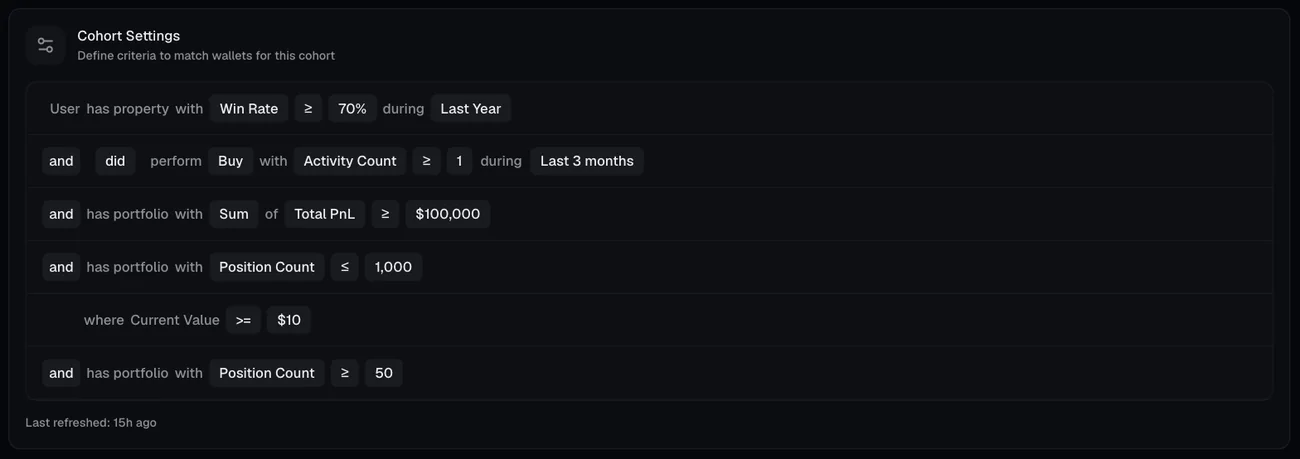
The same five rules in the app. Each one reads like a sentence, and the cohort re-runs them every day.
Specialists
Some sharp traders never get near the top of the overall leaderboard, because they only trade one niche. Our Weather Traders cohort finds them with three rules:
- at least $10,000 of profit on Weather markets over the last year
- at least 25 Weather positions
- a Weather win rate of at least 75%, all time
The same pattern works for any category you know well. Swap Weather for Soccer, the NFL or Crypto, and adjust the numbers until the list looks like the traders you had in mind.
Your watchlist: Followed Wallets
Every Datadash account comes with a special static cohort called Followed Wallets, pinned to the top of your Cohorts list. You fill it by hitting Follow on any trader's profile, and that trader goes straight into the cohort. Unfollow them, and they're taken out.
There are no rules to write and no addresses to paste. Follow a handful of traders you like, and you get everything below for that group, starting today.
What you get once it exists
Open a cohort and you'll find:
- Overview: headline numbers (Traders, Total PnL, ROI and Total Volume) and a leaderboard of members you can sort by PnL, ROI, win rate, positions, volume and more, over a day, a week, a month, a year or all time.
- Portfolio: the whole group's open and closed positions in one place.
- Activity: one trade feed covering every member.
- Category: where the group makes and loses its money.
- Signals: only the Signals from this group's wallets.
- Smart Money: how this group leans on every market compared with the price, just like our Smart Money page, but with your traders.
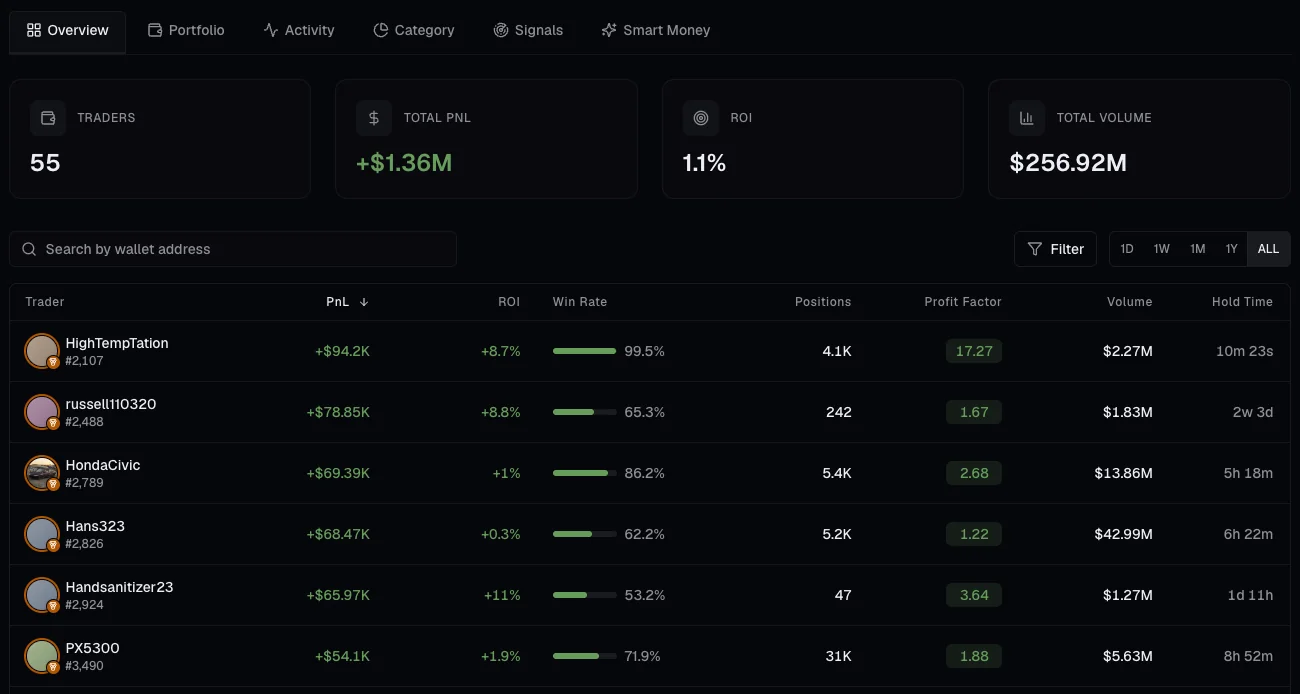
Weather Traders on October 1, 2026. The leaderboard shows each member's overall stats, while the cohort's rules only look at Weather markets.
A cohort is a lens, not just a list
Here's the part people miss. Anywhere Datadash asks "which wallets?", a cohort can be the answer.
On the Smart Money page, "smart money" means the top 1,000 traders by default. Pick your cohort in the scope picker, and smart money now means your traders. The Signals tab on a cohort works the same way: the same scoring, just narrowed to wallets you trust. And alerts can watch an entire cohort at once, which brings us to the best part.
Turn a cohort into alerts
Once you have a group you trust, you don't want to check it every hour. Create an alert that fires when any member buys or sells more than an amount you choose, within a window from one hour to one month. You'll get a notification in the app, and you can have it sent to Telegram as well.
A dynamic cohort makes this even better. As new traders start qualifying, the alert starts watching them too, without you touching a thing.
Tips for a good cohort
- Require a track record. A minimum number of positions filters out lucky newcomers.
- Add a recency rule. "Bought in the last 3 months" drops wallets that have gone quiet.
- Keep bots out. Cap open positions, or exclude a cohort of wallets you know are bots.
- Use category stats for niches. Overall stats hide specialists.
- Spot-check the members. Open a handful of wallets and make sure they look like the traders you had in mind.
A few questions we get
Do dynamic cohorts update automatically? Yes. They re-run every day, and you can refresh one whenever you want.
Who can see my cohorts? Cohorts you create are marked Private and are just for you. Featured cohorts are the ones we curate for everyone, plus your own Followed Wallets, which only holds the traders you follow.
Can I use cohorts outside the app? Yes. Our MCP server can create and manage cohorts from tools like Claude Code or Cursor, and the API can scope its analytics to a cohort's wallets.
Try it
Open Cohorts, start from a featured cohort, or hit New Cohort and build your own. Then check its Signals and Smart Money tabs, and set an alert so the cohort can do the watching for you.